Complex files in seconds: akte:anlegen uses AI to extract the relevant data from your documents, identifies the parties involved and exports it all into a new or existing Advoware file.
Complex files in seconds: akte:anlegen uses AI to extract the relevant data from your documents, identifies the parties involved and exports it all into a new or existing Advoware file.
akte:anlegen
Complex files in seconds: akte:anlegen uses AI to extract the relevant data from your documents, identifies the parties involved and exports it all into a new or existing Advoware file.
Maramia GmbH

plus VAT

No basic fee, no minimum term, no notice period
Maramia GmbH
akte:anlegen uses AI to read the data for a new file from emails, PDFs and photos, identifies the parties involved and transfers everything, including documents, to Advoware. Anything legally sensitive is confirmed beforehand by a person in your law firm.
Where the AI should not have the final say, you keep it: for critical fields, you configure a mandatory review. Your law firm also decides for itself how data is extracted and worded. Fields, rules and wording can be adjusted at any time without involving the vendor, to suit your practice areas and your file structure. The result: less typing, verified records from the very first minute and more time for the actual client work.
There is no basic fee and no set-up cost, and there are no price tiers. You are charged only for each file actually created. The number of users has no bearing on the price, and the first five files are free of charge.
At a glance
A complex accident file with more than 50 practice-area-specific fields is created in seconds instead of 15 minutes of typing.
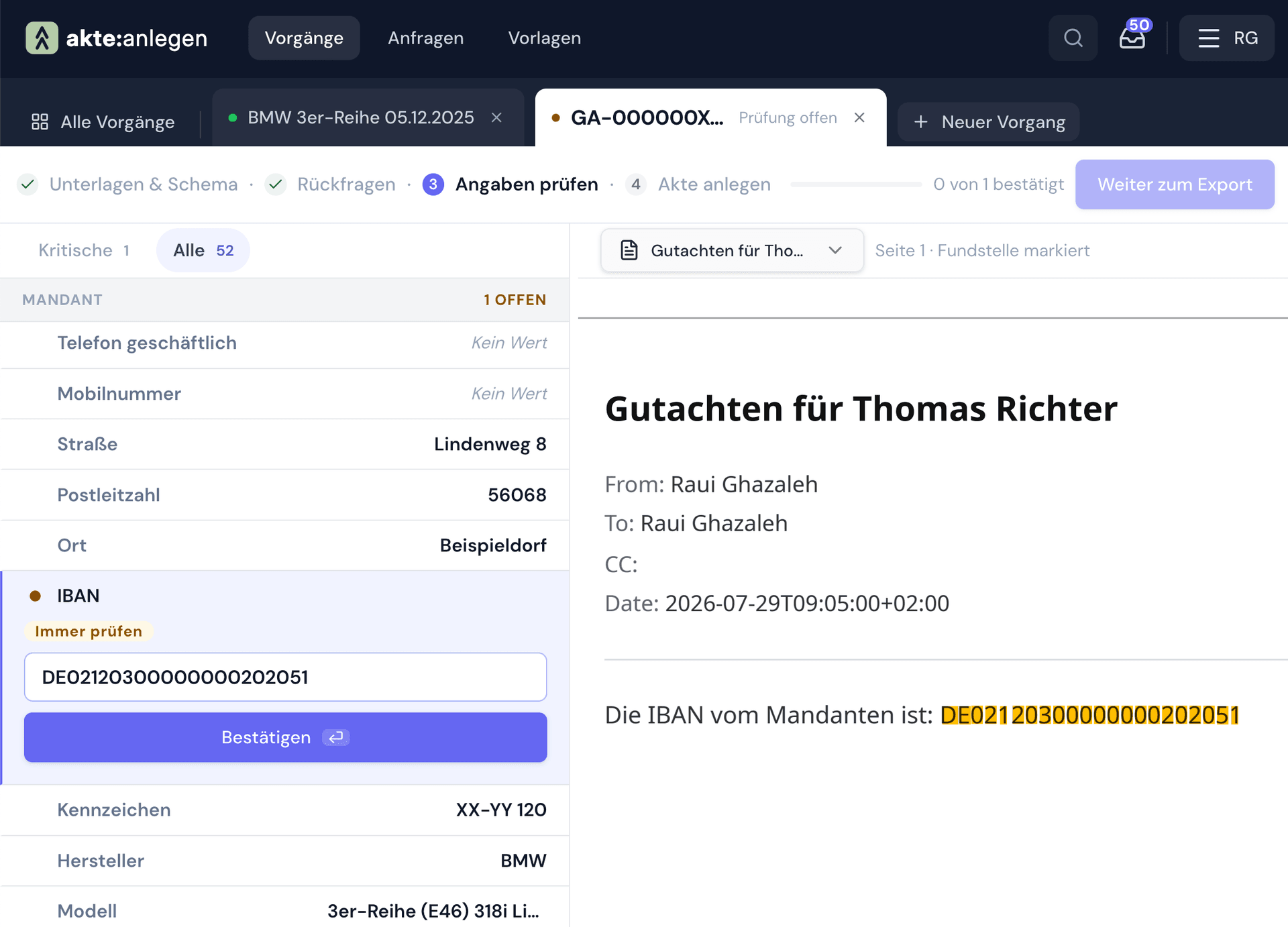
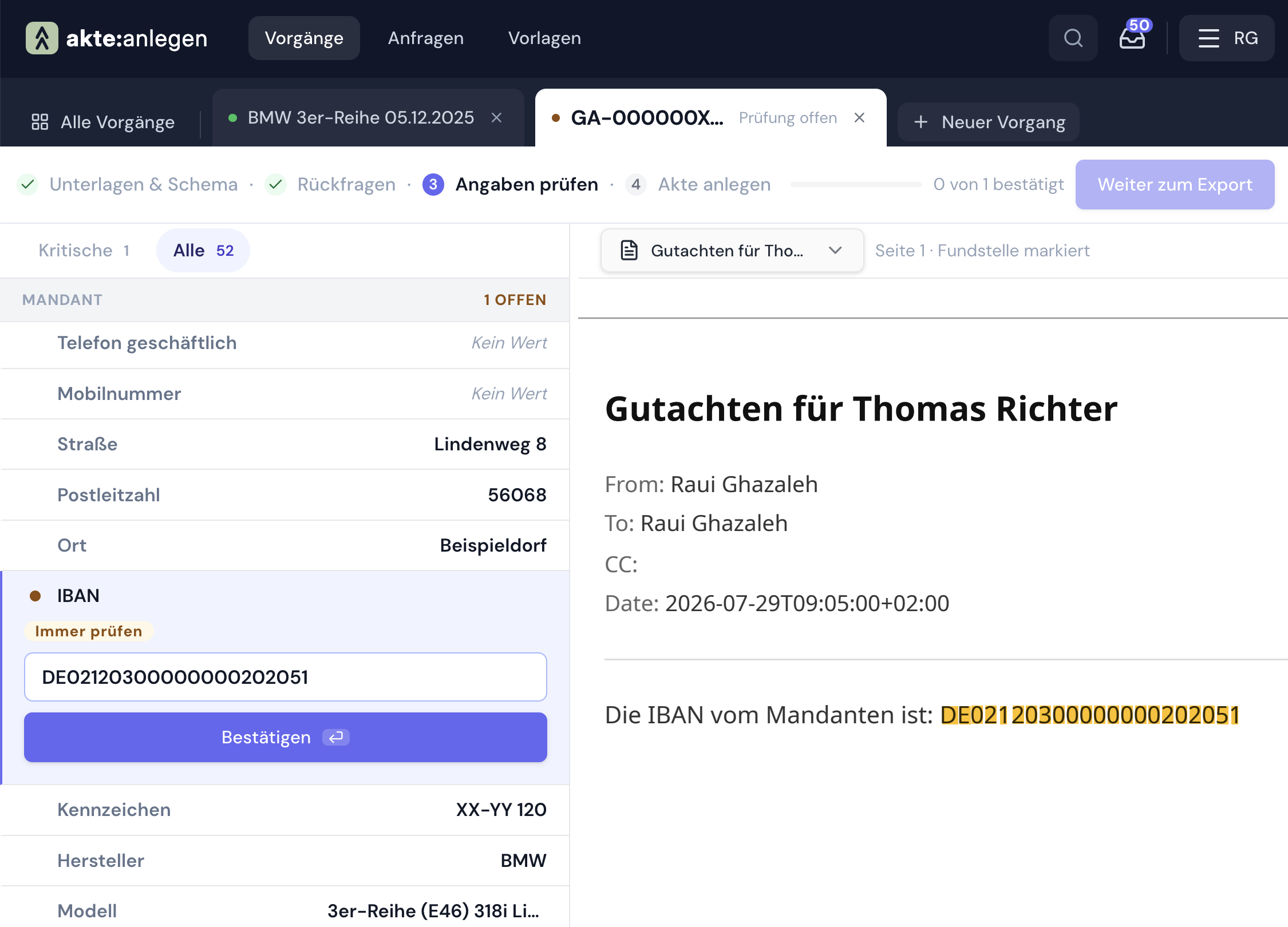
For fields such as the IBAN, you define a mandatory confirmation, with the source displayed and a traceable record of who confirmed which entry.
Existing parties are found in your Advoware records and reused wherever possible; new ones are created only when necessary.
You request missing information via a private link, pre-filled by the AI, mobile-friendly and with no user account needed for the client.
You can adjust fields, rules, wording, questionnaires and user roles yourself at any time, without a support ticket and without waiting.
€4 per file created, no basic fee, no minimum term, no notice period. Additional staff cost nothing.
“The best app I have used in a long time! akte:anlegen makes creating new accident files enormously easier and thereby saves the working time of one member of staff.”
Andreas Gursch
Specialist lawyer in traffic law
How akte:anlegen works
The process follows what already happens in the secretarial office: documents arrive, are reviewed, end up in the file, and whatever is missing is requested from the client. akte:anlegen takes the typing out of each of these steps.
1 Upload
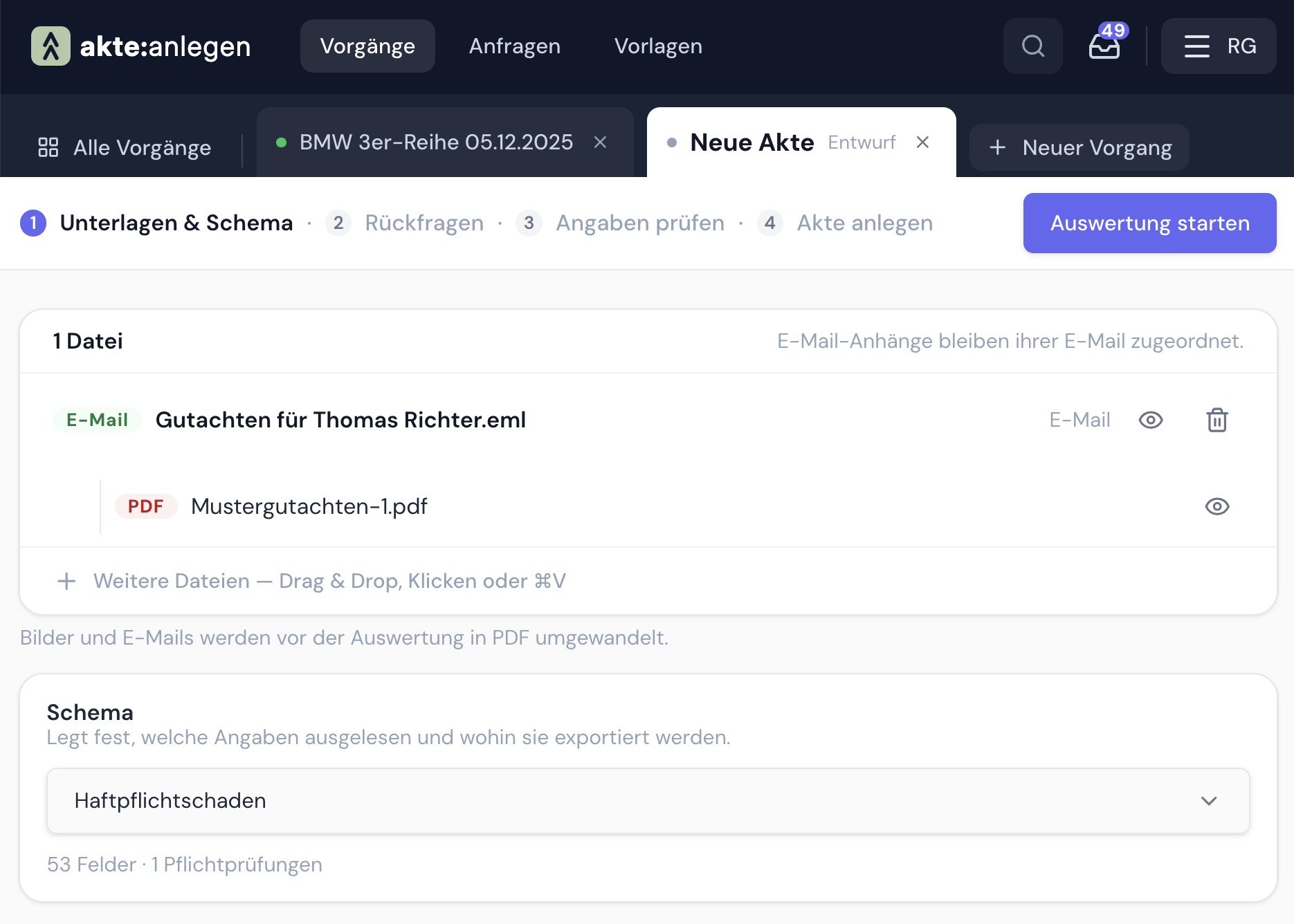
Whether the accident report arrives as a PDF, as a complete email with five attachments or as a photo taken on the client's phone: you drag the file into akte:anlegen and the rest happens automatically. The software splits emails into their attachments, analyses each document individually and copes with crooked photos just as well as with clean scans. There is no need for preparation, renaming or converting.
2 Review
An AI can make mistakes, and if an IBAN or a case reference is wrong, the law firm bears the consequences. That is why you decide, field by field, whether it must be approved manually before export. The review is deliberately kept simple: the extracted value appears right next to the place in the document it came from, so a glance is enough. Who approved which value is logged and can be traced at any time afterwards.
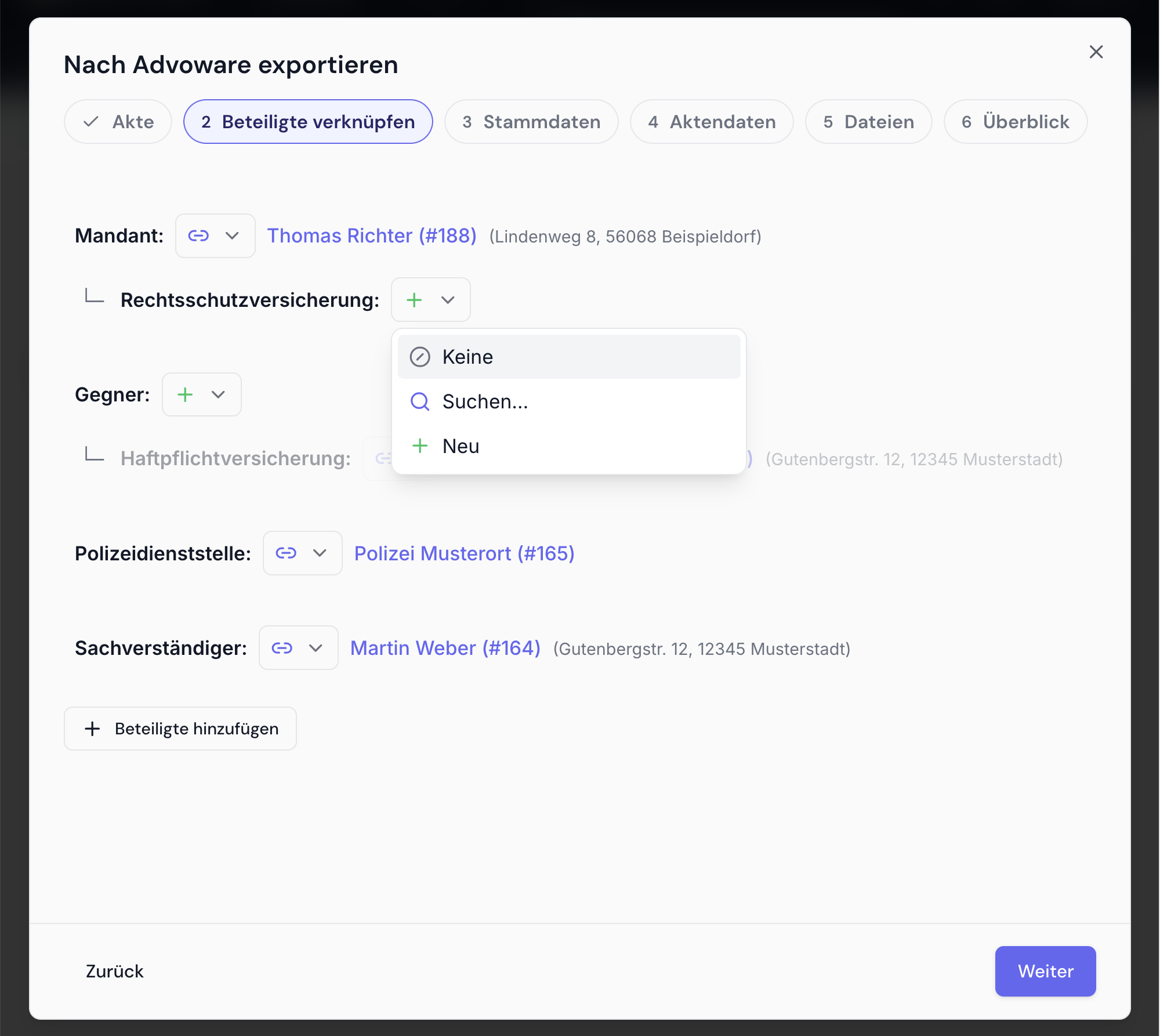
3 Export
With one click, a new file is created in Advoware, or an existing one is supplemented with the new data. Before creating parties, akte:anlegen checks against your Advoware records: known clients, opponents or insurers are reused and updated where necessary, so no duplicates arise. Follow-up reminders, direct messages and inbox then work as they do with any other file.
The documents are delivered along with it, in two versions: the original and a processed version. Photos become cropped PDFs that are searchable thanks to text recognition, and emails become readable PDF printouts.
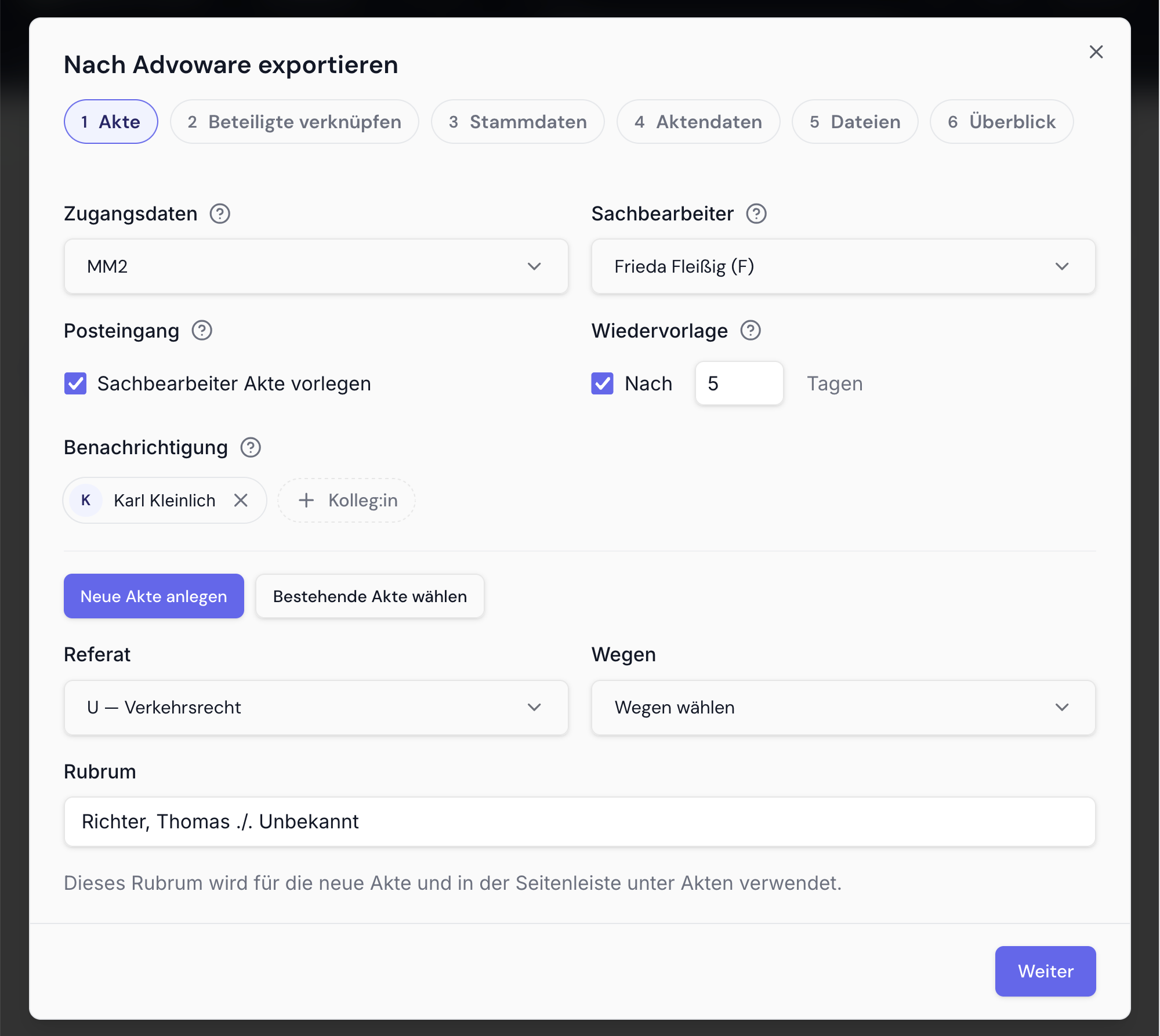
4 Follow-up
If something is still missing after extraction, such as the bank details or the course of the accident, the AI assistant creates a suitable client questionnaire in seconds. Your existing paper forms serve as a template; alternatively, the AI drafts a new one. Everything already in the file is pre-filled. The client opens a personal link on their phone or computer, without registering, completes only the outstanding points, and the answers go straight into the file.
Security and data protection
All data is processed and stored on servers in Germany, and no AI models are trained on your file contents. akte:anlegen therefore meets the requirements that law firms must impose on a data processor.
Further information
€4 one-off per file created, plus VAT. You are charged only for what has actually been created in Advoware. There are no set-up costs, no basic fee and no price tiers. Billing takes place monthly via Septeo, and the first five files are not charged.
No minimum contract term and no notice period. The licensing model is usage-based and not tied to a number of users. Additional staff cost nothing.
For law firms that use Advoware, in particular those with a high volume of new files and many parties involved, for example in traffic, family, employment, social security and criminal law.
Direct connection to Advoware for file creation, parties and documents. For this, the Advoware interface must be enabled for your law firm; Septeo handles the activation as part of the set-up.
Nothing needs to be installed; akte:anlegen runs in the browser. Getting started involves three steps: an online introduction to the software by Maramia, activation of the Advoware interface by Septeo, and a second online session in which the secretarial team learns how to use the software.
An up-to-date browser is enough. Chrome, Safari and Firefox are supported, each on Windows, macOS and Linux. The interface is in German.
Frequently asked questions
Yes, it does not work without Advoware. The software is designed for export to Advoware and requires an enabled Advoware interface for this. Other law firm software is not currently supported.
That is what the mandatory review is for. You determine which fields must be confirmed by a member of staff before export, typically bank details, case references or deadlines. The extracted value is displayed next to where it was found in the document, and the approval is logged with name and time. Responsibility thus remains demonstrably with the law firm.
Manageable, because nothing needs to be installed. There are three steps: Maramia presents the software in an online appointment, Septeo enables the Advoware interface for your law firm, and in a second online appointment your secretarial team is trained. After that, the law firm is ready to work.
Yes. The AI assistant takes your existing forms as a template and creates an online version from them. If you have no template or would like to start afresh, you can have a questionnaire generated from scratch. You can then adjust both yourself.
PDFs, complete emails including all attachments, and photos of documents, for example from the client's smartphone. Attachments are recognised automatically and analysed individually; no pre-sorting is necessary.
The price is €4 one-off per file created, plus VAT. There is no basic fee, no subscription and no minimum term. To get to know the software, the first five files are free of charge.
As many as you like. Your law firm manages user accounts and roles itself, without consulting the vendor. Additional users incur no costs, because billing is solely per file created.